Three programs for one desktop.
Mantle redraws the Windows 11 shell. Quartz is a browser where everything is a tab. Helm runs your Claude Code sessions in a real window.
Each one works on its own. Use one, two or all three.

4:15:32PM
Saturday, October 31
System
- CPU
- 12%
- Memory
- 6.1 GB / 11.7 GB
- Battery
- 72%
Wi-FiMaple-5G · 5 GHz
BluetoothOn · slow
Night lightOff
Energy saverOff · Settings
Airplane modeOff
Do not disturbOff
Focus30 min
ProjectExtend
CastWindows’ panel
Brightness66%
Volume42%
Power modeWhen plugged in
EfficiencyBalancedPerformance
Plan: Balanced
Game modeOff · starts with your games
Turn onDetails ⌄
Top barShown · Win+Alt+T hides it
Hide top bar
Hot corners2 on · push the pointer in
Top leftTask view
Top rightOff
Bottom leftOff
Bottom rightShow desktop
72% · 3 hr 4 min leftWindows quick settings


 4
 72%
4:15:32 PM10/31/2026
Shows this part of the screenshot.
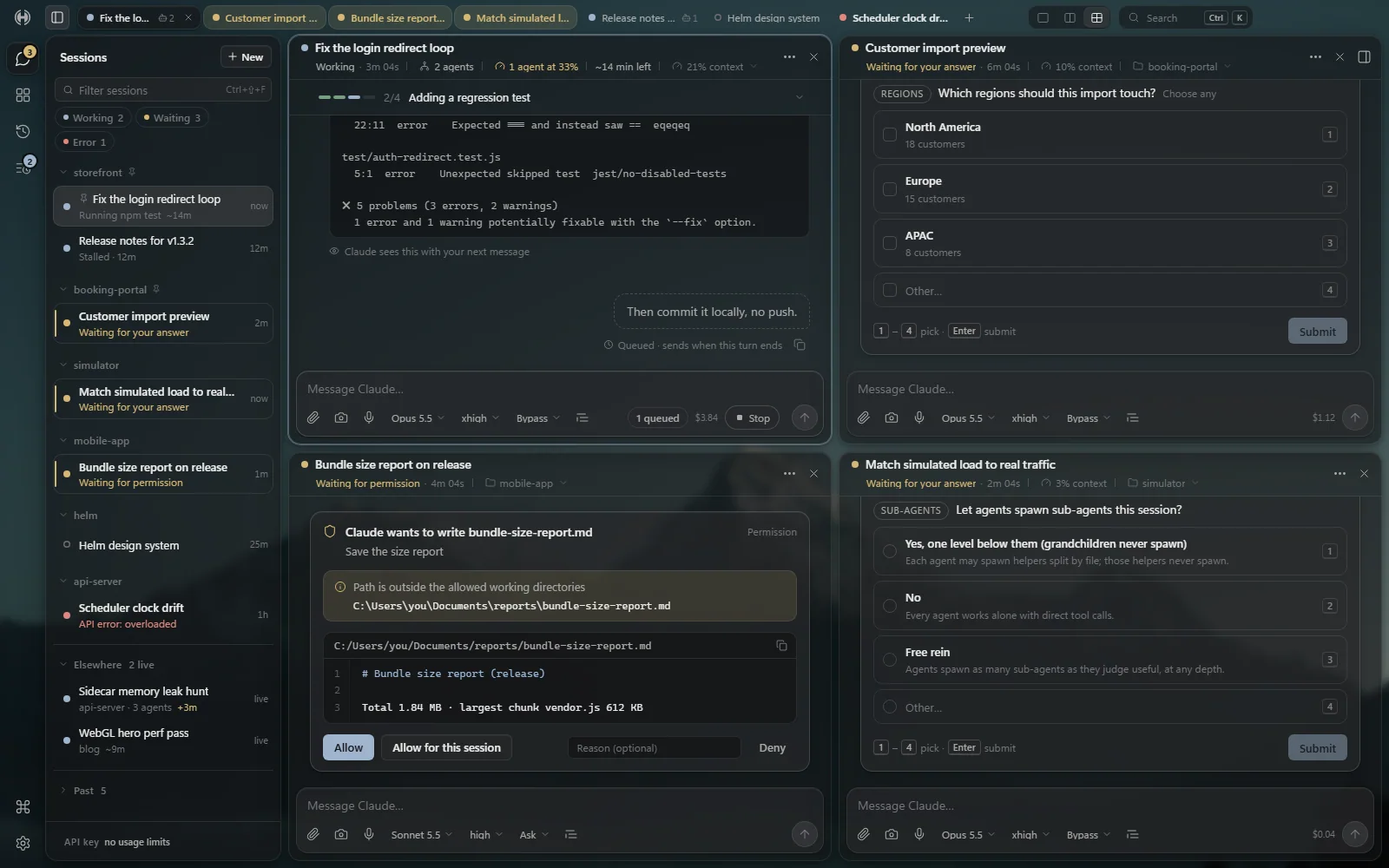
HelmFor Claude Code · desktop app and phone page
Helm: Your Claude Code sessions in a real window.
Helm keeps the Claude Code you installed and replaces the terminal screen with a sidebar of every session, a conversation you can read, and panels for agents, changes and usage.
Point at a to see itTap a to see it
- The same UI on your phone. A phone page over Tailscale, paired with a QR code.
Helm doesn’t reimplement Claude. Every session is the real Claude Code CLI that you install yourself; Helm only replaces the terminal screen.
Windows 10 and 11, x64 · needs your own Claude Code, signed in
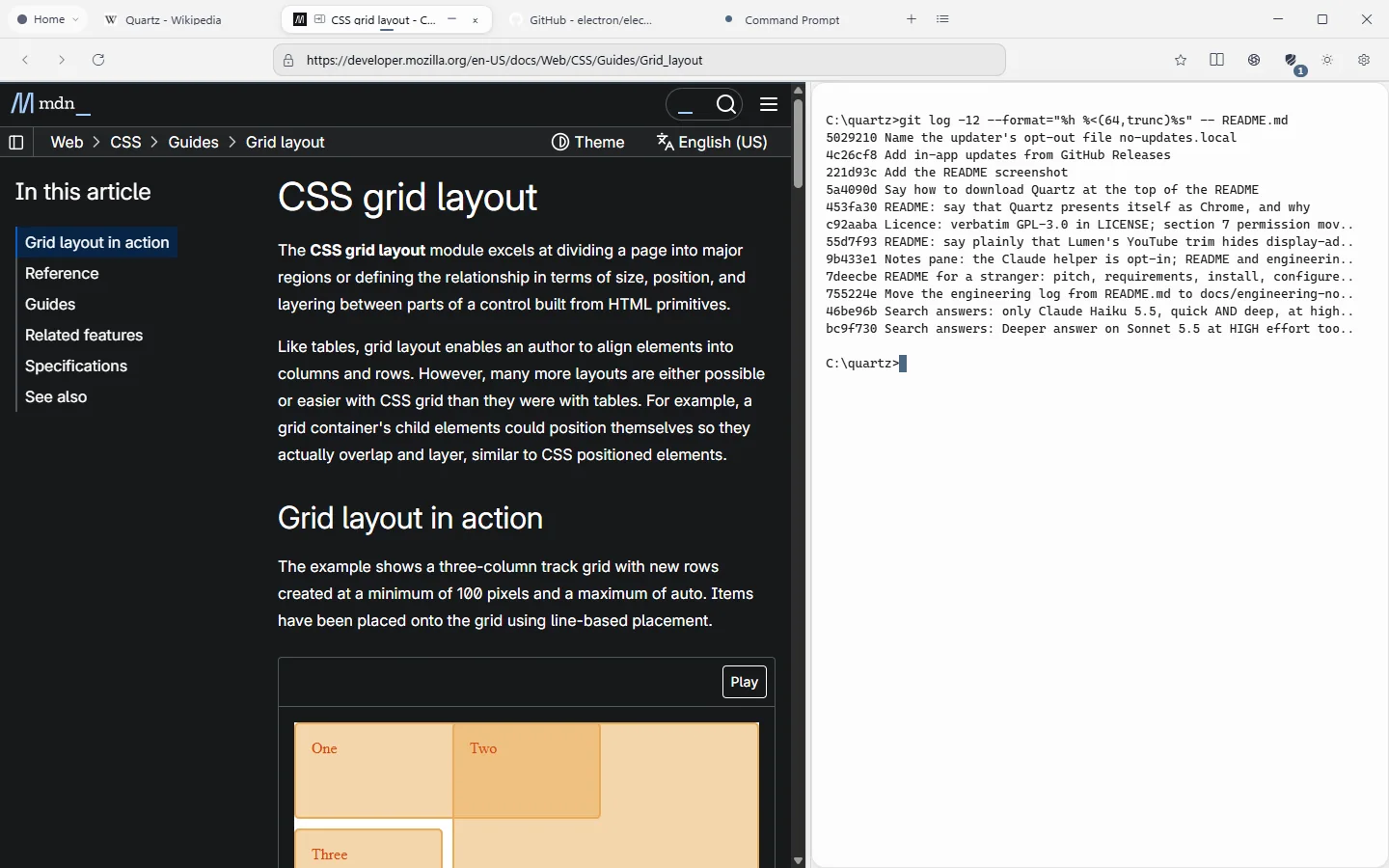
 QuartzBrowser · built on Electron
Quartz: A browser where pages, terminals and apps are all tabs.
A Windows desktop browser where web pages, Claude Code sessions, terminals, native Windows apps and your Android phone all live as tabs.
Point at a to see itTap a to see it
Also: Reader mode, per-site styles and scripts, light and dark themes, and a new tab page where every piece can be hidden or moved.
Windows 11, x64 · Claude tabs need Claude Code
MantleShell layer · Windows 11
Mantle: A new shell for Windows 11, laid over the old one.
Its own bar, launcher, desktop, notifications and system pop-ups, drawn in Electron, with Explorer still running underneath.
Point at a to see itTap a to see it
- Its own windows. A launcher on Alt+Space, notifications, a Task Manager, Files, Settings, clipboard history, snap layouts and an Alt+Tab switcher.
- Windows comes back. Ctrl+Alt+Shift+Backspace, the tray menu or a standalone restore script puts Windows back as it was. The original shell state is saved to a file before anything changes.

4:15:32PM
Saturday, October 31
System
- CPU
- 12%
- Memory
- 6.1 GB / 11.7 GB
- Battery
- 72%
Wi-FiMaple-5G · 5 GHz
BluetoothOn · slow
Night lightOff
Energy saverOff · Settings
Airplane modeOff
Do not disturbOff
Focus30 min
ProjectExtend
CastWindows’ panel
Brightness66%
Volume42%
Power modeWhen plugged in
EfficiencyBalancedPerformance
Plan: Balanced
Game modeOff · starts with your games
Turn onDetails ⌄
Top barShown · Win+Alt+T hides it
Hide top bar
Hot corners2 on · push the pointer in
Top leftTask view
Top rightOff
Bottom leftOff
Bottom rightShow desktop
72% · 3 hr 4 min leftWindows quick settings
4
72%
4:15:32 PM10/31/2026
Mantle changes how Windows draws its shell, and it runs at your own risk. It has been built and tested on one Windows 11 PC.
Windows 11 only
How the three fit together.
Each one works on its own. On one desktop, they share a wallpaper and a theme, and pass status and links between them.
There’s no bundle, shared account or suite installer. Each program installs and runs by itself.
-
One look.
One shared file holds the theme, accent and glass. Mantle adds its wallpaper; Helm and Quartz pick it up, so all three show the same photo.
-
Waiting chats.
Helm counts the chats waiting on you or stopped on an error. Mantle’s bar shows that number on Helm’s icon.
-
Links.
A link opened from Mantle goes to your default browser, and Quartz can be that browser: its first-run setup asks.
Early software, said plainly.
All three are free software under GPL‑3.0, at version 0.1.1.
They are Windows only, and each has been built and tested on one machine. That’s early software, and the table says so.
Issues are welcome on each repository. Pull requests aren’t accepted right now.
| Helm | Quartz | Mantle | |
|---|---|---|---|
| Version | 0.1.1 | 0.1.1 | 0.1.1 |
| Licence | GPL-3.0 | GPL-3.0 | GPL-3.0 |
| Windows | 10 and 11, x64 | 11, x64 | 11 |
| Tested on | one machine | one machine | one machine |
| Lines of code | 74,577 | 182,327 | 307,007 |
| Of them tests | 21,097 | 40,538 | 94,532 |
Non-blank lines of tracked source on each public master, minus vendored, docs, minified and generated files. Tests: test/ folders and test-named files. Counted .
Built in the open.
All three live in public repositories on GitHub. Here is the tip of each master branch when this page was built.
Owen-Silva on GitHubDownload one, or read every line first.
Each has a per-user Windows installer with no admin prompt. It isn’t code-signed yet, so Windows SmartScreen warns you once: choose More info, then Run anyway. Or build it from the folder you clone.
-
Helm
Your Claude Code sessions in a real window.
Windows 10 and 11, x64 · v0.1.1 · Helm-Setup.exe, 109.2 MB
Needs your own Claude Code, signed in. Setup steps
-
Quartz
A browser where pages, terminals and apps are all tabs.
Windows 11, x64 · v0.1.1 · Quartz-Setup.exe, 131.9 MB
Built and tested on one Windows 11 machine. Setup steps
-
Mantle
A shell layer for Windows 11, with a floating island bar.
Windows 11 · v0.1.1 · Mantle-Setup.exe, 139.6 MB
At your own risk: built and tested on one Windows 11 machine. Setup steps