 Quartz
v0.1.1GPL-3.0Windows 10/11 x64
Claude Code, in a real window.
Helm is a Windows desktop app for people who already run Claude Code, usually several sessions at once. It keeps the CLI you installed and replaces the terminal screen with a sidebar of every session, a conversation you can read, and panels for agents, changes and usage.
Helm-Setup.exe · 109.2 MB · Windows 10/11 x64 · v0.1.1
Needs your own Claude Code install, signed in.
Fix the login redirect loop
Running npm test · 3m 04s 2 agents 21% context storefront
Signing in sends people straight back to /login. Find out why and fix it.
The guard reads the session before the cookie is written, so a fresh sign-in looks signed out and gets sent back.
Readsrc/auth/guard.js
Editsrc/auth/guard.js+4−1
−if (!session.user) return toLogin(req);
+await session.ready;
+if (!session.user) {
+ return toLogin(req, req.path);
+}
Bashnpm test -- auth
Then commit it locally, no push.
Queued · sends when this turn ends
Release notes for v1.3.2
Stalled · 12m 8% context storefront
Draft the release notes for v1.3.2 from the merged pull requests.
Reading the merged pull requests since v1.3.1, then grouping them by area.
Bashgit log v1.3.1..HEAD --merges
Customer import preview
Waiting for your answer · 6m 04s 10% context booking-portal
Preview the customer import before it runs.
The file has customers in three regions. I’ll only touch the ones you pick.
Claude has a questionAnswer to continue
RegionsWhich regions should this import touch?Choose any
Bundle size report on release
Waiting for permission · 4m 04s mobile-app
The release bundle is 1.84 MB. Saving the size report with the others.
Claude wants to write bundle-size-report.mdSave the size reportPermission
Path is outside the allowed working directoriesC:\Users\you\Documents\reports\bundle-size-report.md
Scheduler clock drift
API error: overloaded 31% context api-server
The nightly jobs start a minute later every day. Find out why.
GrepsetTimeout
API Error: 529 overloaded. The turn stopped; send again to retry.
How it works
It’s the real Claude Code.
Helm doesn’t reimplement Claude. Every session is the Claude Code CLI you install yourself, driven through Anthropic’s Claude Agent SDK. Helm only replaces the terminal screen.
- Your setup carries over.
- Your CLAUDE.md files, memory, hooks, MCP servers and skills work exactly as they do in the terminal.
- Your sign-in stays yours.
- Helm never signs you in and never sees your login. Sessions use whatever Claude Code is signed in with, or an Anthropic API key you add in Settings.
- The screen
 HelmSidebar, conversation, inspector, phone page
- Yours, installed by youClaude Code CLI
- YoursYour sign-inYour Claude account, or an Anthropic API key
Sessions
Run several sessions, and read every one.
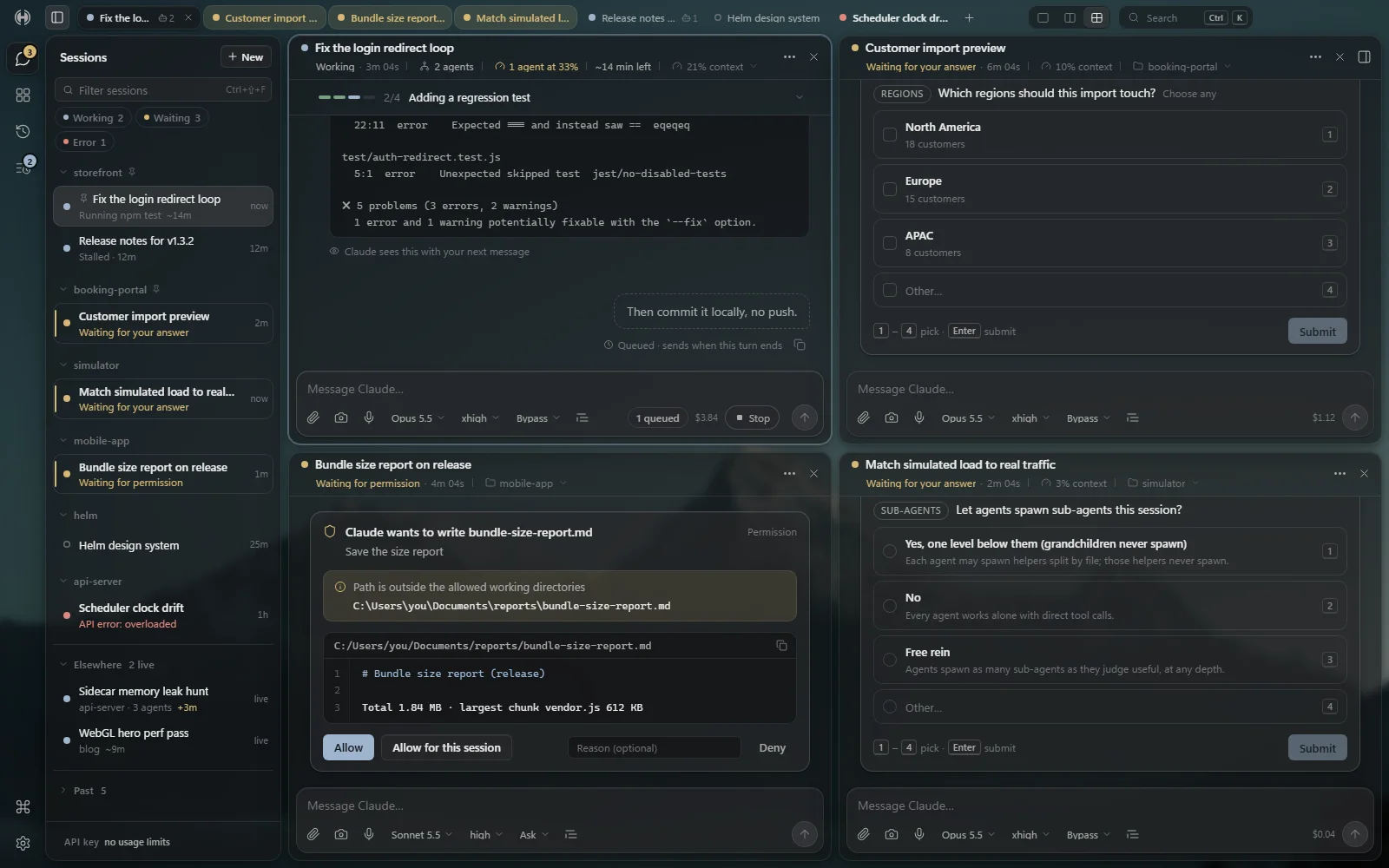
Every session at a glance.
Every project and session in the sidebar, with a dot for working, waiting on you or error, unread counts, filter chips, and a split view of two sessions.
Read what Claude is doing.
Markdown answers, collapsible thinking, tool cards with diffs, and permission, question and plan cards you answer in place.
Find your way around.
Search and resume past sessions, a Ctrl+K palette, a quick-prompt hotkey (Ctrl+Alt+Space), and tray notifications.
Inspector
What the terminal scrolls past, kept in view.
The inspector sits beside every session: the sub-agent tree with context bars, Changes with diffs and checkpoint rewind, Files, a localhost Preview, and Usage for your 5-hour window, week and cost.
The 5-hour and week readings exist only on Claude account plans. With an API key, Usage shows cost.
Trace where the session cookie is written2m 40s
27.4%
Run the auth tests against the fix1m 12s
34.1%
Past 32%, due for a hand-off.
Find every redirect to /loginran 1m
12.0%
Checkpoints2
Click a line to comment · Shift-click for a range
5-hour window42%
Resets in 2h 10m15 pts under even pace
8.4%/h·about 55% at reset·under pace
This week18%
Resets in 3d 4h37 pts under even pace
Cost today$4.12
History
Overnight queue · Production guard
Queue the work for tonight. Pause before production.
Overnight queue.
Add prompts to a queue. Each one starts when the 5-hour budget allows, or after a time you set. It won’t start while your 5-hour usage is above the share you set.
Production guard.
Helm can stop Claude before it pushes to a production branch you list or runs a Railway deploy, and ask you first. It holds in every permission mode. It’s opt-in: you list the repos in prod-guard.json.
Production push · My App mainPushing My App main deploys production.Production
Helm’s production guard stopped this, whatever the permission mode. Nothing runs until you choose; no answer in 30 min counts as Deny.
Commit the fix and push it
git push origin main
%APPDATA%\Helm\prod-guard.json
{ "repos": [ { "name": "My App",
    "remotes": ["github.com/your-org/your-app"],
"branches": ["main"] } ] }Phone
Answer it from your phone.
The same UI in a phone layout, served from your PC over Tailscale. You pair once by scanning a QR code.
It’s a web page on your phone, not an app you install.
Phone
Scan with your phone’s camera, or open the link on any device on your tailnet. The link carries Helm’s key: treat it like a password.
https://your-pc.your-tailnet.ts.net/?key=…Copy
Fallback if https is down: http://your-pc:4871/?key=… Copy
Allow phone access
HelmNew
Filter sessions
Working2Waiting2Error1
storefront
Fix the login redirect loopRunning npm test · ~14mnow
Release notes for v1.3.2Stalled · 12m12m
booking-portal
Customer import previewWaiting for your answer2m
mobile-app
Bundle size report on releaseWaiting for permission1m
api-server
Scheduler clock driftAPI error: overloaded1h
Home2SessionsHistoryQueueSettings
Download
Download and set up.
-
Helm
Claude Code, in a real window.
Windows 10/11 x64 · v0.1.1 · Helm-Setup.exe, 109.2 MB
Needs your own Claude Code install, signed in to your Claude account, or an Anthropic API key.
SHA-256 c1f0c7b17e859f1e982652cf959a4f83e156fcac0d2547d3b644e958ddb8536a
After you download
- Install Claude Code from Anthropic (code.claude.com/docs), open a terminal, run
claudeand sign in once. - Run
Helm-Setup.exe. - Windows shows “Windows protected your PC” because the installer isn’t signed yet. Click More info, then Run anyway. There’s no admin prompt.
- A short install window appears, then Helm opens.
- First run only: a “Getting Helm ready” window downloads Anthropic’s Claude Agent SDK (about 1.6 MB) from the npm registry. If that fails, it says why (offline, npm blocked, a proxy), and Try again retries.
Updates. Settings → Helm → Updates shows when a new version is out. Choose Download the installer and run it over the old one; your settings stay.
Uninstall. Settings → Apps → Helm → Uninstall. It removes the app and the downloaded SDK. Your settings and sessions in %APPDATA%\Helm stay.
Requirements
- Windows 10 or 11, x64. Windows only.
- Your own Claude Code install, signed in to your Claude account, or an Anthropic API key.
- Internet on first run, to fetch the SDK.
Why the SDK isn’t in the installer
The Claude Agent SDK is Anthropic’s software, so Helm’s installer doesn’t ship it. Helm fetches it from npm on your machine the first time it runs, and the build fails if any Anthropic file ends up inside.
Prefer to build from source?
You’ll need Node.js 22 or newer, with npm, and git.
git clone https://github.com/atlas-studio-software/helm
cd helm
npm install
npm startnode tools/make-exe.js builds a Helm.exe with a proper icon, and two scripts in bin\ add a Start Menu entry and a helm command.
Phone, optional: Tailscale on the PC and the phone, plus a one-time firewall script run as admin.
Limits
What Helm doesn’t do yet.
- It runs on Windows only. There’s no macOS or Linux build.
- It doesn’t include Claude Code or sign you in. You install Claude Code yourself.
- The phone side is a web page over Tailscale, not a phone app.
- The installer isn’t code-signed yet, so Windows warns you before it runs.
- It has been built and tested on one machine.
Source and licence
Version 0.1.1, GPL-3.0. Issues are welcome; pull requests aren’t accepted right now.
Helm is an independent project. It is not affiliated with or endorsed by Anthropic. Claude and Claude Code are trademarks of Anthropic.